Play it
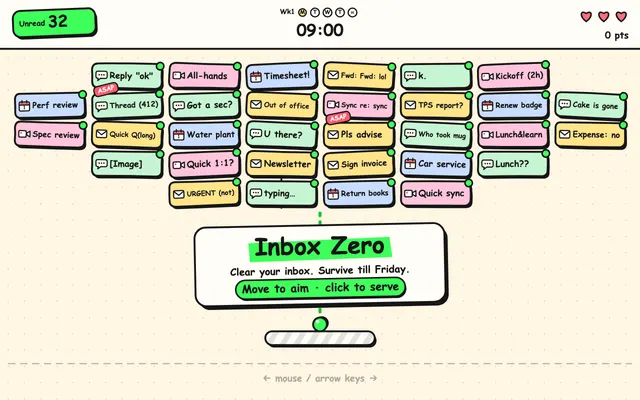 GameInbox Zero · More Fun EditionOpen →
Mia's tips
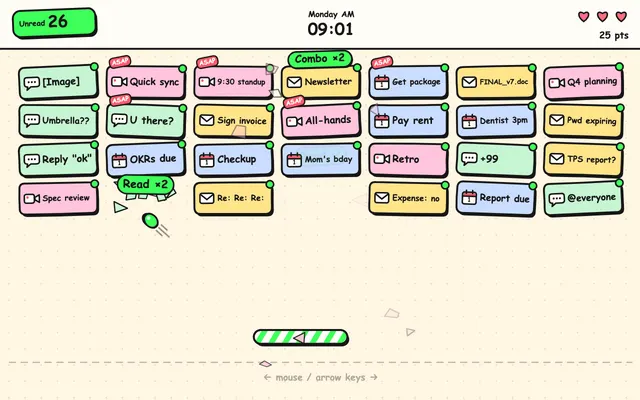
- "Switch version" in the top corner has all eight: the original, Opus 5.5 (Ultracode and plain xhigh), GPT-6.1 Sol (two runs), my revision, and two three.js versions. My revision is the default.
- On a phone, drag to aim and let go to serve, then tap the moment the ball lands to Send it. On a computer, move the mouse and click or press Space.
- A run goes Monday to Friday. Friday at 4 p.m. is the boss: an email called "Quick question". Lose and you get a quarterly performance review.
- The 3D versions have three.js built in, so they're bigger files and open a little slower. If your browser can't do 3D, they fall back to 2D.
Round 1: just one sentence
Simon Willison's line, word for word, sent to the version of the game that's live on this site:
This game isn't fun enough yet. Make it a LOT more fun.
Mia's tips
- Start from a game that already works and has your own idea in it. "Make a brick-breaker" gets you the average one; this line adds craft on top of your idea.
- Let it open a browser and actually play (Claude Code and Codex both can, as long as a sandbox doesn't block it). That's how it finds the boring parts.
- All of these used the top everyday setting: Opus 5.5 in Claude Code (one run with Ultracode, one on plain xhigh), and GPT-6.1 Sol in Codex on xhigh.
- Give it a time or budget limit. My Ultracode run kept going for three hours, right up to the limit I'd set.
Round 2: found problems? Say it like this
Played a bunch of rounds. It's a lot more fun than before! Two problems, though:

1. On my phone, held upright: the messages only fill the top third of the screen, and the ball spends seconds flying through empty space between hits. It drags. Desktop doesn't have this problem. I want there to always be something to hit on a phone too.

2. The first time I opened it: before my first ball I had to get through three cards (the title card, "Pick your mug", and the Monday rules), and I picked a mug before I knew what any of it meant. Lots of people only play one round. I want to be playing within a few seconds, and learn things like Send while I'm actually playing.
Mia's tips
- Each point says three things: what I did, what I saw, what I want. Which line of code to change is its job.
- Play it on a phone at least once. Fine on desktop can be a completely different game on a phone.
Round 3: move it to three.js
Port this game to three.js
During play its camera looked straight down (it said that keeps aiming exact), so to make the 3D obvious I added:
I played the 3D version, and it plays just as smoothly. But I can barely tell it's 3D: during play the camera looks straight down, so it looks almost like the 2D version. I want to see it's 3D at a glance: tilt the camera, like playing on a tabletop. It still has to work on a phone.
Mia's tips
- A brick-breaker is flat to begin with, so 3D mostly makes it prettier. Games with terrain and height, like strategy games, get more out of three.js.