A pelican riding a bicycle
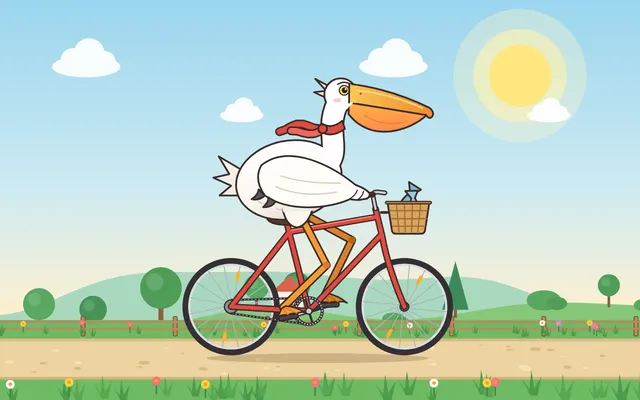
The classic first: one line, no tools, no looking. Then the same idea as an animation, where the feet have to stay on the pedals.
Create index.html: an animation of a pelican riding a bicycle.

- One self-contained file: HTML, CSS and JavaScript with inline SVG or canvas. No external files, no libraries, no network.
- It has to be unmistakably a pelican (the long bill with its throat pouch, the big body, webbed feet) on an unmistakable bicycle (two spoked wheels, a frame, handlebars, a saddle, pedals, a chain).
- It actually rides: the feet stay on the pedals and push them round, the legs bend the way legs do, the wheels turn at the speed the ground goes by, and a bit of scenery scrolls past. A seamless loop of about 8 seconds.
- Make it charming: a drawing you'd want to show someone, not a diagram. No text anywhere in the picture.
- It fills the browser window at any size (16:9 looks best).
- For testing: window.seek(t) jumps to t seconds into the loop and pauses there; window.play() resumes.
Claude Fable 5.2
 AnimationPelican Riding a Bicycle · 4 AI VersionsOpen →
Claude Fable 5.1
AnimationPelican Riding a Bicycle · 4 AI Versions · Claude Fable 5.1Open →Claude Opus 5.5
AnimationPelican Riding a Bicycle · 4 AI Versions · Claude Opus 5.5Open →GPT-6 Astra
AnimationPelican Riding a Bicycle · 4 AI Versions · GPT-6 AstraOpen →The one-line version was just: Generate an SVG of a pelican riding a bicycle. Those four drawings: Fable 5.2, Fable 5.1, Opus 5.5, GPT-6 Astra.
A steam locomotive in 3D
Drag to look around, scroll to zoom. I asked for an old steam locomotive on a short piece of track, built from nothing: boiler, chimney, cab, big and small wheels, rods, cylinders, a cowcatcher. The wheels turn in place, the rods and pistons move with them, and the chimney smokes.
Claude Fable 5.2
Claude Fable 5.1
Claude Opus 5.5
GPT-6 Astra
A Rubik's Cube you can play
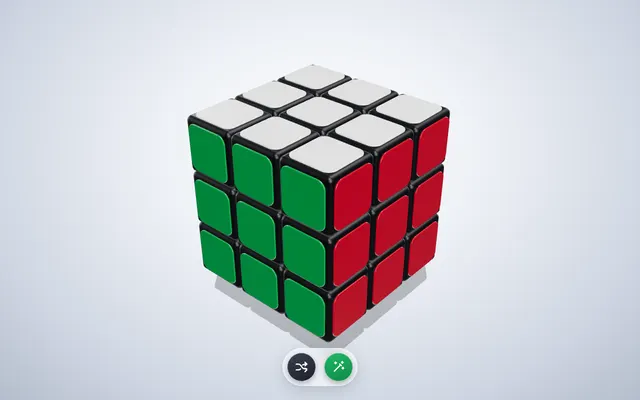
Drag on empty space to turn the whole cube, drag across a face to turn a layer. The two buttons scramble and solve.
Build a 3D Rubik's Cube I can play with in the browser, as one file: index.html.

- Use Three.js, imported as an ES module from https://unpkg.com/three@0.160.0/build/three.module.js (that one import is the only thing allowed from the network: no other libraries, no textures, no fonts).
- A 3x3x3 cube in the standard colours, nicely lit, with rounded-looking stickers, on a simple background. It should look good enough to be the hero image of a toy shop.
- Drag on empty space to orbit the camera around the cube. Drag across a face of the cube to turn that layer, with a smooth animation, the way a real cube turns.
- Two buttons with icons only (no text anywhere on the page): one scrambles the cube with 25 random quarter turns, animated quickly; one solves it, animated, turn by turn, back to the solved state.
- It must always be a real cube: after any sequence of turns every sticker is exactly where it would be on a physical cube.
- For testing, expose window.cube = { turn(move), scramble(), solve(), isSolved() }. move is standard notation ("R", "U'", "F2", also L, D, B); turn, scramble and solve return Promises that resolve when their animation has finished; isSolved() returns true or false.
- It fills the browser window at any size.
Claude Fable 5.2
 3D3D Rubik's Cube · 4 AI VersionsOpen →
Claude Fable 5.1
3D3D Rubik's Cube · 4 AI Versions · Claude Fable 5.1Open →Claude Opus 5.5
3D3D Rubik's Cube · 4 AI Versions · Claude Opus 5.5Open →GPT-6 Astra
3D3D Rubik's Cube · 4 AI Versions · GPT-6 AstraOpen →How a four-stroke engine works
Twenty seconds, one cylinder, and it has to be mechanically right.
Create index.html: a 20-second animated explainer of how a four-stroke petrol engine works.

- One self-contained file: HTML, CSS and JavaScript with inline SVG or canvas. No external files, no libraries, no network.
- A 1920x1080 stage that scales to fit the browser window.
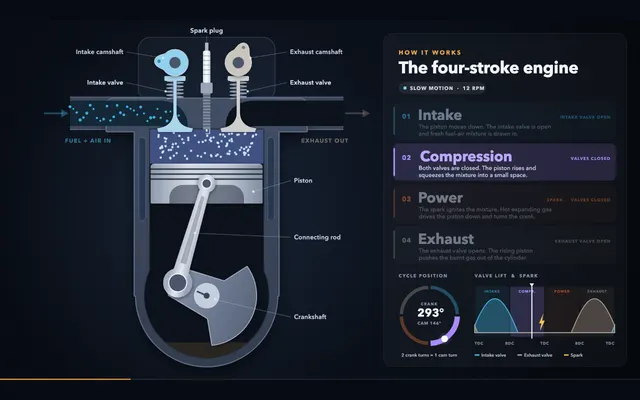
- Show one cylinder in cutaway: piston, connecting rod, crankshaft, intake valve and exhaust valve with their camshafts, spark plug.
- It has to be mechanically right: the piston's position follows from the crank angle and the rod length, each valve opens and closes during the right stroke, the camshafts turn at half the crank's speed, the spark fires at the right moment, fresh fuel-air mixture flows in and burnt gas flows out.
- Name the four strokes on screen as they happen (Intake, Compression, Power, Exhaust), with a small indicator of where we are in the cycle. English text.
- The 20 seconds: start slow enough to follow one full cycle stroke by stroke, then let it run at speed. It loops seamlessly.
- Make it look like a finished motion-graphics piece: considered colours, typography, easing, a little depth. Something a teacher would put straight into a lesson.
- For testing: window.seek(t) jumps to t seconds (0 to 20) and pauses there; window.play() resumes.
Claude Fable 5.2
 AnimationHow a Four-Stroke Engine Works · 4 AI VersionsOpen →
Claude Fable 5.1
AnimationHow a Four-Stroke Engine Works · 4 AI Versions · Claude Fable 5.1Open →Claude Opus 5.5
AnimationHow a Four-Stroke Engine Works · 4 AI Versions · Claude Opus 5.5Open →GPT-6 Astra
AnimationHow a Four-Stroke Engine Works · 4 AI Versions · GPT-6 AstraOpen →Mia's tips
- Each AI worked in its own coding agent (Claude Code for the three Claude models, Codex for GPT-6 Astra) on the default thinking level, medium. One try each, nothing picked or redone.
- I also gave every one a small tool to screenshot its own page. If your AI can look at what it made, tell it to: the ones that checked their work more had fewer rough edges.
- In a plain chat window these prompts work too. Paste one in, ask for a single HTML file, then open the file in your browser.
- The operating systems from the video only run inside an emulator, so they stay in the video.