Play all seven
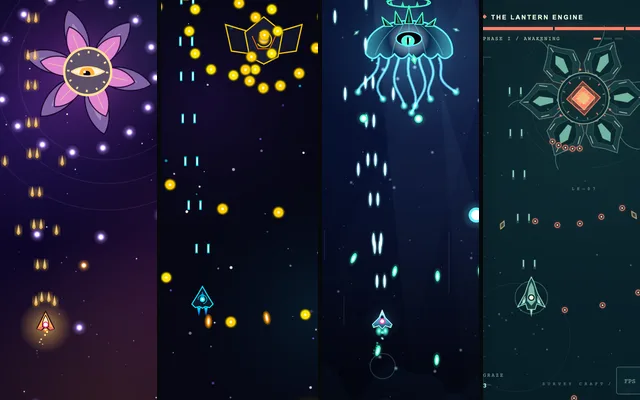 GameBoss-Fight Shooter · 7 AI VersionsOpen →
Mia's tips
- These are the versions after the last round, so every one has a bomb button and an FPS counter you can switch on, and the final phase gets really crowded. Opus's has a graze chain: brushing past bullets without getting hit builds it up.
- The tiny dot in the middle of your ship is the only part that can get hit. It's smaller than it looks.
Dodge the same storm
The exact bullet storm the seven AI autopilots flew in the video. Fly your own ship alongside theirs and see how many you outlast.
Mia's tips
- Your ship has the same top speed as theirs, so you can't just outrun the walls; look for the gap early.
- "Just watch" plays the AIs on their own, and you can speed it up to see who's still flying at the end.
The prompts
I sent these three in order, in the same folder, each in a fresh session, with reasoning on high. GPT-6.1 Terra and Sol ran in Codex, the Claude models in Claude Code, and Gemini and DeepSeek in Claude Code too.
Build a mobile boss-fight shooter in this folder, designed first for a phone held upright.

- One self-contained file: index.html (inline CSS and JS). No external libraries, CDNs, fonts, images or network requests. Draw everything in code.
- Invent your own ship, boss, theme, name and art style. Do not copy characters, names, art or bosses from any existing game.
- Phone first: a portrait layout that fills a 390x844 screen without scrolling or zooming. Touch and drag anywhere to move the ship; the ship sits a little above the finger so the finger doesn't hide it. The ship fires automatically. Mouse drag and arrow keys also work on desktop.
- One boss with three phases. Each phase has its own bullet patterns and gets harder. A boss health bar, hit flashes, explosions and screen shake. Show the player's small hitbox. 3 lives, with a short invulnerability after a hit. A victory screen and a game-over screen, both with a way to play again.
- It should feel good to play and run smoothly on a phone.

You can't ask me questions, so make reasonable choices yourself. Don't install anything (no npm or pip installs, no browser downloads); you may run node to check your logic. When you're done, briefly list anything you're unsure about.
Make it a LOT more fun.
Next update for the boss-fight game in this folder (index.html). Keep everything that already works.

1. Turn the boss's final phase into a true bullet hell: at its peak there should be at least 800 enemy bullets on screen at once, with three new bullet patterns. Add a graze counter (bullets that pass very close to the hitbox without hitting it) and a bomb button with id="bomb" that clears the bullets on screen (2 bombs per life).
2. It must still run at a smooth 60 frames per second on a mid-range phone, even at the peak. Add a small FPS counter that can be switched on and off with a button with id="fps".

Same rules as before: one index.html, no external resources, no installs, no questions. When you're done, briefly list anything you're unsure about.
Mia's tips
- My originals also asked for a small test hook so a script could check every game the same way; I left it out here because you don't need it to play.
- The one-sentence trick is from developer Simon Willison. It works on any little game an AI makes for you, and different models take it in very different directions.