One button becomes a whole app
 AnimationMotion Graphics for a Voice Memo AppOpen →
<role>
You are a motion designer and a creative coder. Using a single stand-alone HTML file (HTML + CSS + inline SVG + vanilla JavaScript), make a UI-motion promo and capture it as a 1920×1080, 60 fps MP4. No external libraries, images or network requests (local woff2 fonts are fine: Geist + Noto Sans).
</role>

<direction>
The flow of an AI voice-memo app. From start to finish there is only one shape and the camera never cuts: every state is the same element changing its width, height, corner radius and background color, with the content inside swapped during a brief blur.
A light warm-grey dot-grid background, black-and-white components, one accent color (neon lime #c8f03c), soft shadows under the components.
A mouse cursor drives every change with real clicks and drags. The camera zooms along so that each state fills the landscape frame. Second 16 is identical to second 0, so it loops seamlessly.
Forbidden: constant-speed motion, jelly-like bouncing, glows, gradients on components, particle bursts, seconds where nothing happens, anything that looks like a template.
</direction>

<structure>
120 BPM, 32 beats (16 seconds); every change lands on a beat:
beat 1   click "Start recording" → a recording bar (the timer fast-forwards to 03:12, the waveform jumps with the drum)
beat 6   click stop → shrinks to a circle, a progress ring advancing one beat at a time
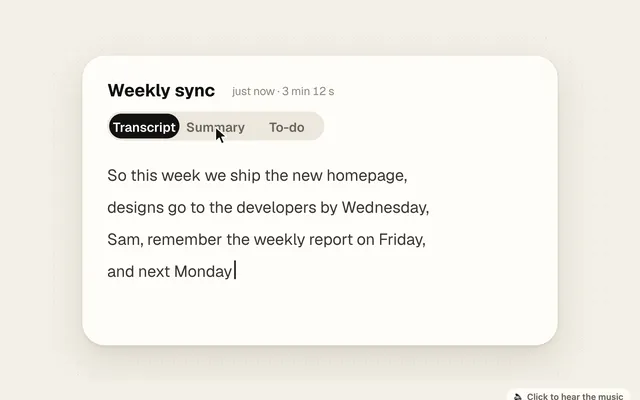
beat 8   unfolds into a white "Weekly sync" card: tabs "Transcript / Summary / To-do", the transcript typing itself out
beat 12  click "Summary": three bullet points pop in one by one
beat 16  click "To-do": three items; on beats 18 and 19 click two of them: check mark + strike-through
beat 20  click the bell next to "Fri · weekly report" → collapses into one reminder row; on beat 21 the switch flips on the beat
beat 22  becomes a "Remind me early" slider: grab the knob and drag right; dragging past the maximum stretches the track; on beat 25 let go and it snaps back to 30 minutes
beat 26  becomes a black notification "Friday 8:30 · Weekly report time", the bell shakes twice; on beat 28 the subtitle swaps to "Added to calendar"
beat 30  collapses back into the "Start recording" button
</structure>

<build>
1. The page exposes window.render(t): every element's size, position, color and opacity is computed from t and written into style. No CSS transitions, no timers, no state between frames.
2. Springs use the closed-form solution of a damped oscillator (period about 0.46 s, damping about 0.78, the barest overshoot). When a value changes target several times, add up the springs of each change; for the loop, include the tails of the previous lap's last changes so that second 16 matches second 0 in velocity too.
3. The tab indicator and the switch knob: one spring per edge; whichever direction it moves, the leading edge uses a fast spring and the trailing edge a slow one, so it stretches while moving. Put a white copy of the labels inside the indicator, clipped with it, so the text always stays legible.
4. Dragging: while held, the value follows the cursor; past the maximum it stretches by 9·(1−e^(−overshoot/9)), harder and harder to pull, and springs back on release.
5. Swapping content inside the morphing container: the old content leaves first, the new one enters once the shape is halfway there, each with its own in and out timing, otherwise old and new text overlap.
6. The page also exports an event table (the second of every click, check, switch and reminder). Synthesize a 120 BPM track in Python with numpy (electric-piano chords, eighth-note bass, a light kick and clap, sixteenth-note hi-hats) and place the UI sounds on the beats from the event table, at −14 LUFS.
7. Open the page with Playwright and, for each frame, call render 4 times evenly spaced within that 1/60 s and screenshot each; have ffmpeg average them with tmix=frames=4 (motion blur) and output a 60 fps MP4.
</build>

<gotchas>
- Don't put will-change on elements the camera scales, or on anything that shows text, or the text goes soft.
- Render one still per beat first and check: is the shape big enough (a landscape frame has far more empty space than a square one; lean on the camera push-in), does any text overlap, which stretch is too empty.
- The last frame must equal the first exactly, cursor position and velocity included.
</gotchas>

<start>
Lay the list of states out on the beat grid and show it to me first; write code after I confirm.
</start>
Mia's tips
- I used Claude Opus 5.5 in Claude Code; what comes out is a single HTML file you can open in any browser.
- To make it your own app, edit the direction and structure sections.
- The premium feel comes from three things: a tiny overshoot on every motion (not jelly!), every change landing on the 120 BPM beat, and motion blur where things move fast. They're all in the prompt, so don't delete them.
- Click the picture to hear the music. The downloaded page still runs without the fonts; it just falls back to system fonts.