
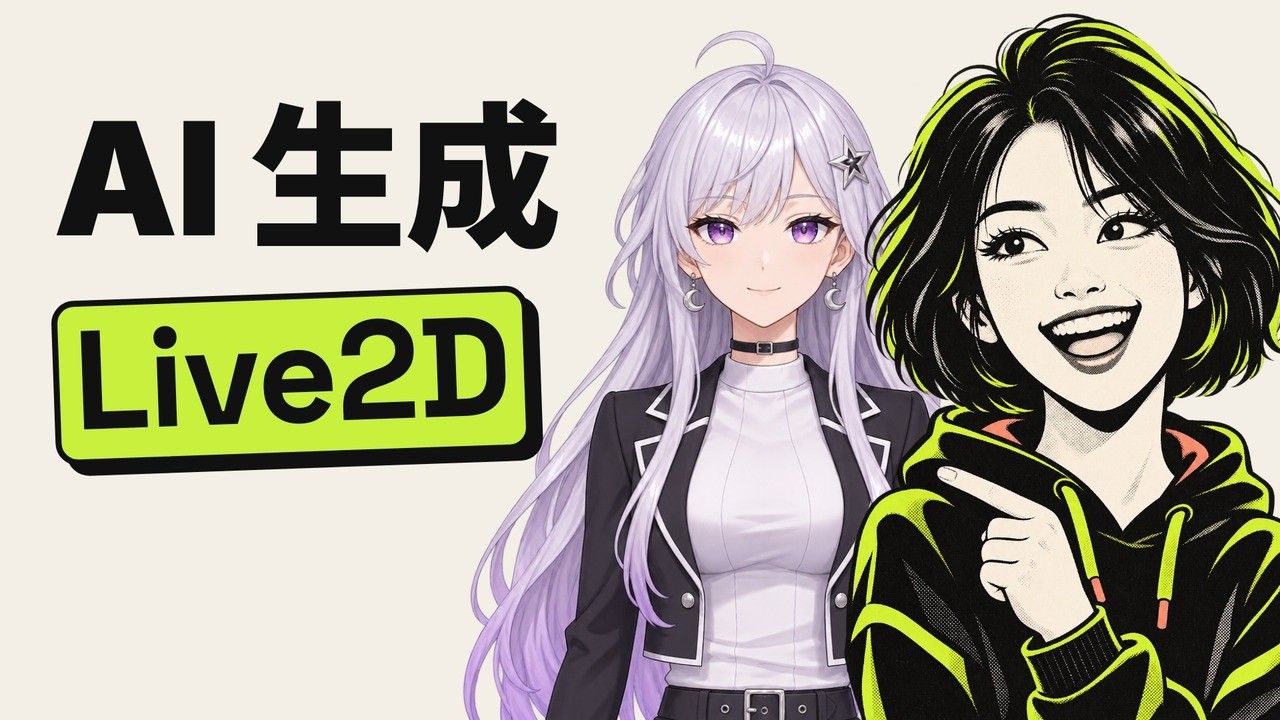
用 AI 免費做 Live2D 模型:一張圖變成會動的 VTuber
她就在下面,滑鼠或手指一動就看過來。生圖、改圖的提示詞能直接複製,她拆好的 PSD 也能下載,拖進綁骨工具自己玩。

跟她玩一下
移動滑鼠(手機上用手指拖),她的頭和眼睛會跟著你;點一下換個表情,一共五種,再點回到平常。
 動畫會看著你的 Live2D 風角色打開 →
給你的角色也做一個
我把這套流程做成了一個免費的小工具:放一張圖進去,拆層、補閉眼和張嘴、綁骨都在裡面走完,最後能下載 PSD,也能直接拿去開播。補閉眼、張嘴要用的提示詞也在裡面,複製到 ChatGPT 就行,免費帳號就能生圖。想先看看效果,裡面有一鍵演示。
用到的東西,全都免費
- 畫圖:哪個生圖模型都行,我用的是 Codex 自帶的生圖。要點是正面、對稱、手臂別擋身體、劉海別蓋眼睛、睜眼閉嘴、背景乾淨、動漫畫風。
- 拆層:See-through 線上版(Hugging Face,註冊以後一天一兩次),或者照 它的 GitHub 在自己電腦上跑。
- 綁骨:Anime2.5DRig,網頁打開,把 PSD 拖進去就會動。
- 開播:Anime2.5DRig 自帶攝像頭追蹤和給 OBS 用的透明輸出,按 它的說明 在本機開就行。要正經的 Live2D 檔案,同一份 PSD 導進官方的 Live2D Cubism 編輯器。
提示詞
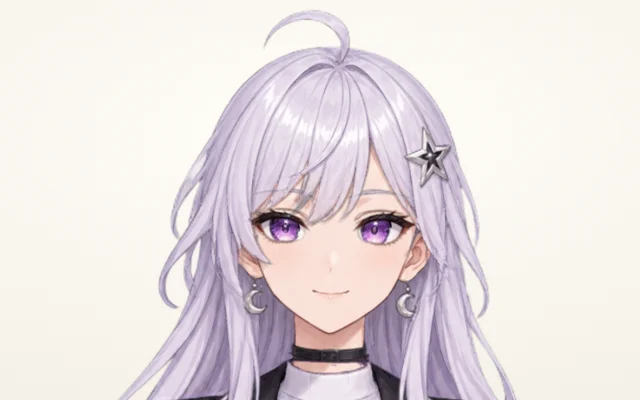
先是她本人。我一次出了三張,挑了這張銀髮的。
Original character design for a VTuber model, drawn as a polished modern Japanese anime key visual (clean cel shading, crisp line art, soft highlights, beautiful mature-looking young woman around 20, elegant not childish, not chibi, not cartoon). Waist-up, facing the viewer straight on, symmetrical standing pose, shoulders level, both arms hanging relaxed at her sides fully visible and separated from the torso. Eyes open looking at the viewer, mouth closed with a gentle calm smile. Long silver-white hair with pale lavender gradient tips falling behind the shoulders, two long front locks over the chest, side-swept bangs that stay ABOVE the eyes and do not cover them, a small ahoge. Violet eyes with detailed highlights. Outfit: a cropped black jacket with white trim over a white high-neck top, a thin black choker, small silver crescent-moon earrings, a star-shaped hairpin on the left side. Even soft studio lighting, no dramatic shadows. The whole character is inside the frame with margin around the hair. No text, no logo, no watermark, no background, transparent background.
看中文譯文
为 VTuber 模型做的原创角色设计,画成精致的现代日系动漫主视觉(干净的赛璐璐上色、利落的线稿、柔和的高光;二十岁左右、看起来成熟的漂亮年轻女性,优雅不幼稚,不要 Q 版、不要卡通)。腰部以上,正对观众,左右对称的站姿,双肩水平,两只手臂放松垂在身体两侧、完整露出、不贴着身体。眼睛睁开看着观众,嘴巴闭着、带一点平静的微笑。银白色长发,发尾是淡淡的薰衣草紫渐变,披在肩后;两缕长长的前发垂在胸前;斜刘海停在眼睛上方、不盖住眼睛;一根小呆毛。紫色眼睛,高光细致。服装:白色高领上衣,外面一件白边的黑色短外套,一条细细的黑色项圈,一对小小的银色月牙耳坠,左边一枚星星发卡。柔和均匀的棚拍光,不要强烈的阴影。整个人都在画面里,头发外面留出空白。不要文字、不要 logo、不要水印、不要背景,透明背景。
原圖是睜著眼、閉著嘴的,拆不出閉眼和張嘴。把原圖當參考圖丟回去,各改一張:
Edit the reference image. Reproduce it EXACTLY — the same character, same pose, same framing and position on the canvas, same line art, same colors, same hair, same clothes, same size — and change only one thing: both eyes are now gently closed, as in the middle of a natural blink: relaxed closed upper eyelids drawn as soft downward-curved lash lines in the same anime style, eyelashes visible, eyebrows unchanged, no tears, no smile change. Everything outside the eyes must stay pixel-identical. No text, no logo, transparent background.
看中文譯文
改这张参考图。一模一样地重画它:同一个角色、同样的姿势、同样的构图和在画布上的位置、同样的线稿、颜色、头发、衣服、大小,只改一样东西:两只眼睛轻轻闭上,像自然眨眼的那一瞬间:放松闭合的上眼皮,用同样的动漫画风画成柔和向下弯的睫毛线,看得见睫毛,眉毛不变,不要眼泪,笑容不变。眼睛以外的地方一个像素都不能变。不要文字、不要 logo,透明背景。
Edit the reference image. Reproduce it EXACTLY — the same character, same pose, same framing and position on the canvas, same line art, same colors, same hair, same eyes, same clothes, same size — and change only one thing: her mouth is now open as if she is talking and saying 'ah': a small natural open mouth in the same anime style, showing a hint of upper teeth and a little tongue, lips the same color. Everything outside the mouth must stay pixel-identical. No text, no logo, transparent background.
看中文譯文
改这张参考图。一模一样地重画它:同一个角色、同样的姿势、同样的构图和位置、同样的线稿、颜色、头发、眼睛、衣服、大小,只改一样东西:她的嘴张开了,像在说话、在说「啊」:同样的动漫画风,一个自然的小小的张嘴,露出一点上排牙齿和一点舌头,嘴唇颜色不变。嘴以外的地方一个像素都不能变。不要文字、不要 logo,透明背景。
她的 PSD
19 層:See-through 拆出來的 17 層,加上我補的閉眼(eye_close)和張嘴(mouth_open),原來那層嘴改名成了 mouth_close。另外我把它放大回了原圖的 1024×1536,露在外面的地方換回了原圖的像素,不然 768 的放大有點糊;睫毛那層也挪到了眼睛上面。拖進 Anime2.5DRig 馬上就會動,也能導進 Cubism 自己綁骨。
Mia 的小貼士
- 托腮、抱臂、頭髮糊一臉、眨一隻眼的圖,好看是好看,拆起來全是坑。真想要那個姿勢,先用正面圖做好模型,再靠參數擺出來。
- See-through 免費版預設 768 解析度,拆出來的 PSD 是 768×768 的方塊,比原圖小、有點糊。我在 Mac 上本地跑的也是 768,一張圖跑了一個多小時;有 12~16G 視訊記憶體的輝達顯示卡會快很多。
- 它匯出的 PSD 把睫毛排在眼白和瞳孔下面,眼睛會顯得沒精神。拖進去之前,把
eyelash那層挪到irides上面。 - 補閉眼、張嘴的時候,只裁「變了的那一小塊」。我第一次把嘴連下巴一起裁了,一張嘴,下巴和項圈就疊出了兩層。
- 沒補閉眼的話,Anime2.5DRig 會自己貼一副通用的「^ ^」閉眼和一張通用的嘴,能用,就是不像她本人。
互動版用的是 Anime2.5DRig(MIT 協議,作者 852wa),只改了顯示方式;拆層用的是 See-through。




更多影片
全部 98 部 已看AI 越獄實測:奶奶漏洞騙不了 Claude 和 GPT,一句話卻可以AI 基礎概念 · 10月31日
 已看AI 能當漢化組嗎?我用 GPT 翻了一整話《SPY×FAMILY》AI 工具實測 · 11月5日
 已看2026 年還要學提示詞嗎?老技巧我拿 Claude、GPT、DeepSeek 實測了一遍AI 工具實測 · 11月4日
 已看兩個 AI 聊天不準停:Claude Opus 5.5 和 GPT-6 Astra 聊滿 200 條會怎樣?好玩的 AI 實驗 · 11月3日
 已看AI 做的影片,為什麼總有一股 AI 味?AI 工具實測 · 10月20日
 已看Claude Fable 5.2 對 Gemini 4 Carbon:貴 4 倍,做 3D 遊戲、彈鋼琴差在哪AI 工具實測 · 11月12日
 已看京都人請你吃茶泡飯,GPT 和 Claude 聽得懂潛臺詞嗎?好玩的 AI 實驗 · 11月5日
 已看我用 Claude Fable 5.2 還原了達芬奇的「汽車」AI 工具實測 · 11月13日