

AI 時代的全棧設計師:聽聽 YC 訪談怎麼說
這片草一根根都是 Codex 寫程式碼畫出來的:一個 HTML 檔案,不聯網、沒有一張圖。點開下面的卡片就能拖滑塊玩,讓它從第一句一路改到這樣的四輪提示詞也原樣放著。
自己拖滑塊
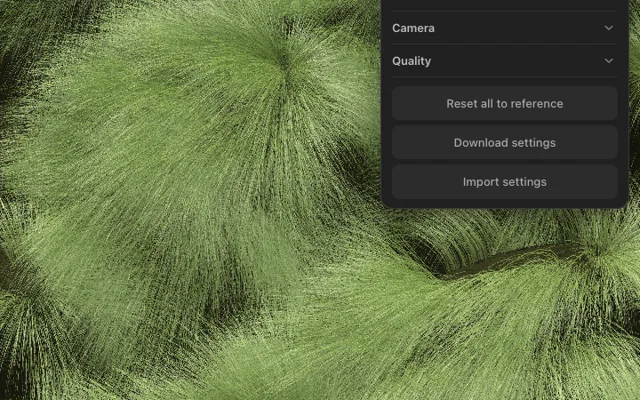 3D程式碼畫的草地(DialKit 調參)打開 →
Mia 的小貼士
- 300 個滑塊別從頭翻,先動這三組:鏡頭(拉遠一點、放低一點)、草葉(草長、粗細)、光照(亮度、暖一點)。我主要就動了這幾個。
- 想看我調完的樣子:先下載上面那個設定檔案,再點面板最底下的「匯入設定」選它。玩亂了點「全部恢復預設」回到 Codex 給的預設值。
- 把「顯示草」關掉,能看到草底下那層地形,一個個小山包都在。
- 一次畫二十多萬根草,挺吃顯示卡;手機上能玩,舊手機會卡,面板點右上角的小圖示打開。
四輪提示詞
全程用的是 Codex(GPT-6.1 Sol,推理 xhigh),四輪在同一個對話裡接著說。我手上有一段草地錄影當參考,你換成自己拍的就行。
Here's a video of grass: grass.mp4 in this folder (frame.jpg is attached as one frame from it).

Take the video, turn this into a shader. I want the shader running in the web, and I want you to be as meticulous as you can. Be very pixel perfect. Grab all the colors. Make sure that you're using the same hex codes. Understand each part of the image and then try to recreate that.

Deliver one self-contained index.html in this folder (WebGL, no network). Portrait, same framing as the video. It should fill the window on desktop and on phones.
Mia 的小貼士
- 這句是反面教材:它會把你的錄影直接貼進網頁、再扭一扭,看著一模一樣,但什麼都調不了。想要「程式碼畫的」,就得在提示詞裡說出來。
I asked an AI coding agent to turn a video of grass into a shader that runs on the web. My prompt was:

"Take the video, turn this into a shader. I want the shader running in the web, and I want you to be as meticulous as you can. Be very pixel perfect. Grab all the colors. Make sure that you're using the same hex codes. Understand each part of the image and then try to recreate that."

Image A is a frame of the real video. Image B is what the agent gave me. Its summary: "Self-contained, offline WebGL using the reference texture, video-derived wind, and responsive fullscreen framing. Offscreen checks confirmed exact initial-frame colors."

It looks the same because it's basically my video frame pasted in and wobbled. That's not what I wanted: I wanted grass made by code, every blade drawn by the shader, so I can change the wind, the blade length, the light.

Why is the other agent not understanding what I'm trying to get to? What exactly should I explain to it, so the next version gets close to the real thing? Keep it practical, I'll paste your answer straight to it.
Rebuild this as procedural grass rendered in the browser. The video is a visual reference for a scene whose individual grass blades are generated by code.

The previous version preserved the photograph and distorted it. That misses the central requirement.

Construction requirements:
- Every visible grass blade must come from procedural geometry or procedural surface intersection calculations.
- Instanced curved blade/ribbon geometry rendered with vertex and fragment shaders is acceptable. Choose a practical GPU approach; a single fullscreen fragment shader is optional.
- Do not use video frames, grass photographs, image-generated grass, or prerecorded footage as runtime textures, backgrounds, billboards, color maps, or animation.
- Procedural mathematical noise is fine.
- The finished scene must render and animate with all reference media removed.

Study the reference before implementing. Identify its camera angle, framing, tuft arrangement, blade curvature, density, color variation, lighting direction, and shadow structure.

The visual features to reproduce are:
- Dense, irregular mounds of long, extremely fine grass, with overlapping tufts and deep shaded gaps.
- Blades that emerge from rooted clusters, arch over, and drape along coherent local directions.
- Variation within and between tufts: length, curvature, orientation, thickness, and color. Avoid obvious repeated clusters.
- Layered detail: large mound shapes, smaller bundles, and individual fine strands.
- Green, olive, yellow-green, and occasional dry strands, with bright sunlit edges and dark tuft interiors.

Match those relationships and the reference camera first. Sampling hex codes alone will not reproduce the appearance: the visible colors also depend on illumination, shadow, blade orientation, and light passing through thin leaves. Use measured reference colors to inform material and lighting choices.

Implement wind as blade deformation:
- Keep roots anchored.
- Increase bending toward blade tips while approximately preserving blade length.
- Combine broad traveling gusts with smaller, locally varied motion.
- Give neighboring blades correlated motion without making every tuft move identically.

Provide controls for wind strength, direction, gust speed, blade length, density, and light direction/intensity. These controls must change the underlying grass or lighting calculations.

Work in stages:
1. Match the static camera, tuft masses, blade shapes, and density.
2. Match lighting, shadows, translucency, and color variation.
3. Add wind and controls.
4. Compare screenshots against the reference and correct the largest visible differences.

Verify the result:
- Freeze wind: the static grass should still resemble the reference.
- Change blade length: actual blade shapes and silhouettes must change.
- Rotate the light: illumination and shadowing must respond.
- Show an additional camera angle or close-up that demonstrates individual blades and depth.
- Remove the source media and confirm the app still works.

Deliver the implementation and a concise account of remaining visual differences and measured performance. Prioritize believable grass structure and lighting before polishing the interface.
Mia 的小貼士
- 第 2 輪這段不是我寫的,是另一個 AI 看了兩張截圖以後替我寫的。說不清哪裡不對的時候,這招很好用:把「想要的」和「它做的」並排丟給另一個 AI,問它該怎麼講。
This is a photo of dense ornamental grass growing in mounds. Render a topographical map of the underlying structure: the ground surface hidden beneath the grass, as if all the grass were removed. Show the little hills and hollows exactly where the mounds and gaps are in this photo, from the same camera angle and framing, as a bare clay terrain with thin contour lines. No grass, no text.
Look at the video again. The grass isn't growing on a flat layer. Underneath it, the ground is little hills and hollows: every mound in the video is a hill with grass on top, and the dark gaps are the low ground between them.

I had an image model render a topographical map of the structure under the grass: topo.png in this folder (attached). Same camera, same framing as the video, the grass removed.

Build the terrain from this map first: high where the map is high, low where it's low, in the same places. Then grow the grass on top of it, rooted on the terrain, so the mounds and gaps line up with the video. You can load topo.png at runtime as a height map, but don't draw the image itself. Everything you can see should stay procedural.
I can tell when the grass looks off, but going back and forth with you in chat doesn't work for that. Let's expose the underlying structure so I can tune it myself.

DialKit (Josh Puckett's library for live parameter controls) is in ./vendor/dialkit: browser.global.js and styles.css, plain JavaScript, works offline (see its README.md). Put a DialKit panel on the page and wire every value that changes how the grass looks or moves to a dial, toggle or color control, grouped in folders. Include a toggle that turns the grass off so I can look at the terrain on its own. Replace the old controls with this panel. It has to work on a phone too: touch works, and the panel can collapse so it doesn't cover the grass.

Also tell me: how many grass blades are there right now, and how much do their lengths actually vary?
Mia 的小貼士
- DialKit 是 Josh Puckett 做的調參面板,npm 上叫 dialkit,MIT 許可。不想裝也行,直接說「把影響外觀的參數都做成滑塊」,大多數 AI 都會給你做一個。
- 後三輪它每輪都悶頭幹了半個多小時,別以為卡住了。





更多影片
全部 98 部 已看讓 Claude 開小賣部,結果錢全虧光了AI 那些事 · 10月28日
 已看2026 年還要學提示詞嗎?老技巧我拿 Claude、GPT、DeepSeek 實測了一遍AI 工具實測 · 11月4日
 已看AI 能當漢化組嗎?我用 GPT 翻了一整話《SPY×FAMILY》AI 工具實測 · 11月5日
 已看我把 AI 關在 1900 年,它能比愛因斯坦先想出相對論嗎?好玩的 AI 實驗 · 10月30日
 已看你每天用的加密,藏著 NSA 的後門嗎?懸了 25 年,Claude 半小時破案AI 那些事 · 11月12日
 已看兩個 AI 聊天不準停:Claude Opus 5.5 和 GPT-6 Astra 聊滿 200 條會怎樣?好玩的 AI 實驗 · 11月3日
 已看一人公司真的來了?YC 公佈 2026 創業現狀AI 那些事 · 11月7日
 已看AI 能找到失落之城 Z 嗎?我用亞馬遜雷射雷達考了 Opus 5.5AI 那些事 · 11月14日